
Request For Quote Template (2026): Editable Pack and Example

On this page14
- Request for quote template preview
- Prepare the request for quote template
- Item schedule fields
- Make units comparable
- Ask about freight, tax and access
- First response example
- Handle questions fairly
- Receive and keep quotes
- Compare more than the total
- Move from quote to order carefully
- Source and limits
- Final request check
- FAQ
- Verdict on the request for quote template
A request for quote template asks vendors to price the same defined goods or work. Give them amounts, units, specs, delivery needs and response fields before comparing prices. Keep their first responses intact and resolve scope gaps before selecting a quote.
An RFQ should name the buyer, package, scope revision, item schedule, response deadline, question route and needed price details. Ask vendors to state exclusions, substitutions, tax and freight treatment. Unknown prices or conditions stay open. A low headline number is not comparable when the scope or delivery basis differs.
Page updated 25 October 2026. Source check dates are reported separately in the text and comparison.
Request for quote template preview
This original example concerns a made-up shelf package for a small storage room. It shows how to collect comparable responses, not a real purchase or a vendor recommendation. The actual specification and quantities must come from your job files.
| Request field | Example entry | Why it matters |
|---|---|---|
| RFQ record ID | RFQ-014 revision 1 | Keeps responses tied to one package |
| Buyer | Example Property Team | Names who is requesting prices |
| Project | Storage-room shelf package | Distinguishes the work from another order |
| Scope basis | Plan A revision C | Gives every vendor the same baseline |
| Item schedule | Six shelves of the specified type | Count and product type remain separate |
| Delivery location | Buyer enters real receiving point | Freight depends on the real destination |
| Needed delivery | Buyer enters date and access window | Exposes lead-time differences |
| Quote deadline | Buyer enters date, time and time zone | Avoids an ambiguous cut-off |
| Question route | Buyer names a working contact method | Keeps clarifications traceable |
| Substitutions | List separately with their differences | Prevents a changed product looking identical |
| Tax and freight | Vendor states included or excluded | Supports a like-for-like total |
Scroll for more →
Prepare the request for quote template
Define what choice you need to make. If you only need a vendor price for a known item, a focused schedule may be enough. If you need a contractor to propose a method against a wider package, the invitation to bid may fit better. Do not make every request into a long tender by default.
Write the package boundary before the item list. State if the vendor is pricing goods only, delivery, install work or a combination. Name work by others where it affects the response. A vendor cannot price a clear boundary from a broad label such as “shelving complete.”
Give each vendor the same scope files. List each file's title, date and revision. If you change the request, say what changed. Record who received it and when.
Ask for the revision number in each reply. This lets you spot a price based on old scope before you compare it.
Item schedule fields
| Field | Entry rule | Example of a problem it prevents |
|---|---|---|
| Item record ID | Stable row number or code | A vendor can ask about the exact item |
| Scope note | Clear product or work definition | A generic label hiding a distinct grade |
| Spec record ID | Real drawing, schedule or standard record ID | A quote against an obsolete need |
| Amount | Buyer-entered count or measured amount | A price that covers only part of the need |
| Unit | Piece, pack, length, area or other defined unit | Comparing a pack price with a single-unit price |
| Vendor unit price | Same unit as the requested amount | A multiplication based on mixed units |
| Extension | Amount times quoted rate | A copied total that does not match its inputs |
| Minimum order | Vendor's real condition | A small request priced below the real order size |
| Pack rounding | Required order increment | A fractional pack presented as an orderable amount |
| Lead time | Vendor-stated period and starting event | Confusing stock supply with delivered readiness |
| Substitution | Separate proposed alternative | A lower price for an unapproved product |
| Exclusions | Clear work or goods omitted | A hidden gap in the apparent low price |
| Quote validity | Vendor-stated expiry or condition | Relying on a price after it expires |
| Warranty reference | Actual vendor terms where relevant | An invented promise copied from a different offer |
Scroll for more →
Keep the item scope note concise but complete. Avoid copying a brand claim that is irrelevant to the spec. If an exact product is needed, use the project's real record ID. If equivalents are allowed, state the evidence needed to review them rather than treating every alternative as approved.
Make units comparable
A unit rate is meaningful only with its unit. Ten pieces at a price per piece differ from ten boxes at a price per box. A rate per hundred feet also needs conversion before multiplying by a measured length in feet. Keep that conversion visible in your private comparison.
Do not change the vendor's first rate to disguise the difference. Record the first and a normalized comparison rate beside it. Include the conversion basis. If pack size is unclear, ask.
An unknown pack count should not become a guessed rate because it makes the sheet easier to total.
For surfaces, keep the measured area apart from the goods you buy. A vendor may sell only full packs or rolls. The pack size can make the order larger than the measured need.
Layout and your chosen waste allowance can add more. Show each step. One unexplained amount hides why you need to order more.
Ask about freight, tax and access
State the delivery location and receiving conditions. A quote to a vendor counter is not the same as a delivered quote. Ask if unloading, special access or a timed delivery is included when those matter to the job. Do not assume that a freight line includes every receiving task.
Ask vendors to label tax treatment. A total including tax cannot be compared directly with a net amount unless you resolve the basis. The request should not prescribe a guessed tax rate. The seller's real transaction rules and the buyer's context need to be known before the final comparison.
If the delivery date is critical, ask what starts the lead time. It may depend on an order, approved submittal, deposit or selection. Record that condition. A number of days without a start event can make an apparently suitable offer miss the real job window.
First response example
Suppose Example Vendor A prices six specified shelves and delivery, while Example Vendor B prices six shelves for collection. B's headline price looks lower. The buyer records collection as a scope difference and asks for a delivered price rather than assuming freight is free.
A third made-up vendor offers a distinct shelf type. The buyer records it as a substitution and checks the differences against the project spec. It does not enter the checked common-scope ranking until the alternative is accepted or the first item is priced.
No real prices are needed to see the issue. The comparison depends on a common scope first. Once the figures and conditions are known, the bid tabulation worksheet keeps first amounts, adjustments and choice notes side by side.
Handle questions fairly
Name one route for trade and price questions. Record the question, reply date and record ID. If an answer changes the common scope, issue the same scope clarification to every affected vendor. Do not reveal one vendor's private price terms to another merely because you need a common baseline.
Give each change that affects the scope a revision or addendum reference. Name the file it replaces. Ask vendors to acknowledge the revised basis in their response. Resolve any response against an old version before comparing its total with the others.
Keep an open-question list. Give each question an owner and due date. Show its state beside the quote total. A note in an attachment can be missed when someone copies only the price. Close the question only when you have saved the answer and checked its effect on scope and cost.
Receive and keep quotes
Save each first response under its vendor name and RFQ record ID. Record the date received and the revision it answers. Keep attachments together with the covering message. A later vendor correction should have its own date and record ID so the comparison can be reconstructed.
Enter the known values into a comparison copy. Keep the first quoted amount in its own column. Use separate columns for checked scope adjustments, assumed comparison allowances and unanswered items. An assumed allowance must not be presented as a vendor's revised price.
Unknown amounts should stay out of an automatic lowest-price result. A blank cell is not zero. Likewise, an item marked “not stated” is not necessarily excluded. Ask if it is included elsewhere before adding the cost again.
That check can avoid double counting as well as missing work.
Compare more than the total
Use the criteria that matter to this package. Price, scope compliance, lead time and delivery conditions may each affect the choice. Record what evidence supports a claim that an offer meets the need. A generic “approved” note without a record ID is hard to verify later.
Do not invent a weighted scoring method after seeing the prices. If the job has a needed buying process, follow it. This small-job worksheet does not replace public procurement rules, conflict-of-interest needs or the buyer's own delegated authority. It records a comparison.
It does not grant permission to place an order.
Write a selection reason in plain terms. For example: “The chosen response covers the specified item and delivered basis with no open scope questions.” Do not claim that the vendor is universally best or that the choice guarantees a successful job. Keep the choice tied to the kept evidence.
Move from quote to order carefully
A vendor quote is one record. Your order or agreement is another. Before you order, check the chosen quote revision. Check its items, counts and delivery terms too.
Resolve any clash with the terms you requested. The title of this form does not decide whose terms apply.
Tie the order reference to the RFQ and selected quote. Keep the other responses as part of the decision record where appropriate. If the project changes after selection, confirm whether the quote and delivery commitment remain valid. Do not stretch an old quote to cover new work without confirmation.
If you are preparing a client-facing offer rather than buying from vendors, use the quote template. The quote email helps name the sent attachment. The main estimate guide shows how vendor costs enter private costing without being exposed in the client file.
Source and limits
The baseline, basis note and update method draws on the GAO cost guide. The first RFQ structure adapts those ideas to small contractor buying tasks. It does not copy a vendor form or claim to be a prescribed government request. Source checked 15 October.
Full revision date is shown above.
The pack's arithmetic uses an explicit two-decimal rule checked against Microsoft ROUND. That rule helps reconcile amounts. It does not decide tax treatment, a vendor's obligations or whether an alternative meets a technical specification.
Final request check
Open the exact files you will send. Match the item schedule, revision and deadline to the covering request. Check that a supplier can find the question route and delivery destination. Keep a distribution record.
Send a correction under a new revision and identify the file it replaces. A complete request helps you distinguish a supplier omission from a question you did not ask clearly.
FAQ
Is an RFQ the same as a bid proposal?
An RFQ asks for vendor prices against a defined request. A bid proposal is a vendor's or contractor's outgoing offer. The exact meaning can vary with the buying process and wording. Use the file that matches the task and keep the request and response together under a common package record ID.
Can I compare a delivered price with a collection price?
Only after resolving the scope difference. Keep both first amounts and record the checked delivery or collection adjustment apart. Do not assume that freight is zero because a vendor left it blank. Include receiving conditions if they affect the real job.
Then compare the offers on the same stated basis.
What if the cheapest response has missing fields?
Mark it open and ask for the missing facts. A low known amount plus unknown work is not a checked low comparable total. Keep the question and reply in the record. If you use a temporary basis note for planning, label it clearly and keep it separate from the vendor's offer.
Do I have to choose the lowest total?
Follow the real buying rules and authority for your job. This form does not impose or replace a selection policy. Record the linked scope, timing and qualification evidence with the price comparison. A clear reason for the choice is more useful than a spreadsheet that silently selects a winner.
Verdict on the request for quote template
Use the request for quote template to collect prices against one clear baseline. Keep first responses, resolve gaps and compare the delivery and scope that you actually need. Record the choice before moving to an order.
Inside the original file
This is the actual A4 example from the editable pack, version 1.0.0. All names, measurements, dates and amounts are invented for the form demonstration.
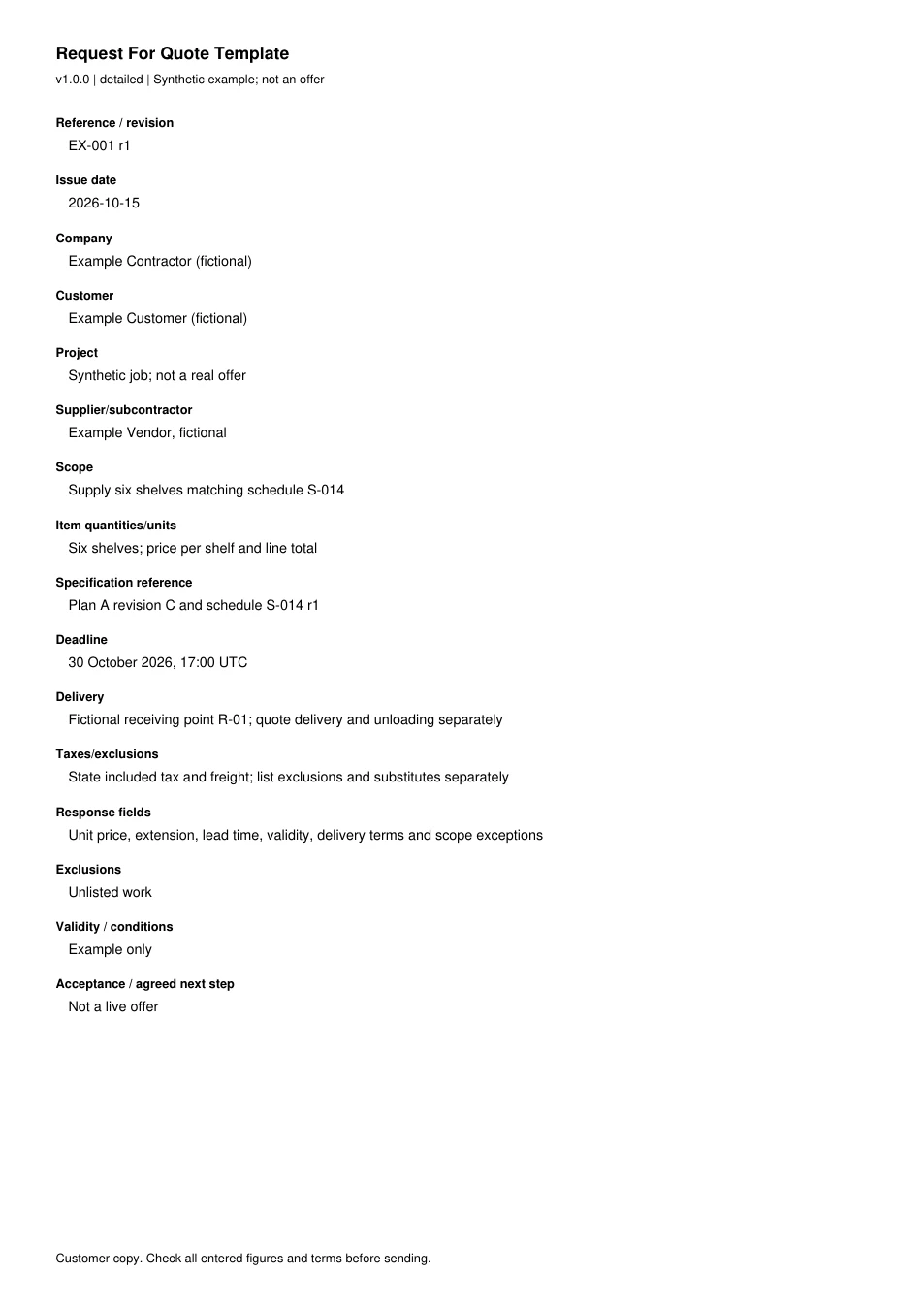
Read every field in the example
- Reference / revision
- EX-001 r1
- Issue date
- 2026-10-15
- Company
- Example Contractor (fictional)
- Customer
- Example Customer (fictional)
- Project
- Synthetic job; not a real offer
- Supplier/subcontractor
- Example Vendor, fictional
- Scope
- Supply six shelves matching schedule S-014
- Item quantities/units
- Six shelves; price per shelf and line total
- Specification reference
- Plan A revision C and schedule S-014 r1
- Deadline
- 30 October 2026, 17:00 UTC
- Delivery
- Fictional receiving point R-01; quote delivery and unloading separately
- Taxes/exclusions
- State included tax and freight; list exclusions and substitutes separately
- Response fields
- Unit price, extension, lead time, validity, delivery terms and scope exceptions
- Exclusions
- Unlisted work
- Validity / conditions
- Example only
- Acceptance / agreed next step
- Not a live offer