
Contractor Invoice Template (2026): Editable Pack and Example

On this page11
- Contractor invoice template preview
- Complete the contractor invoice template
- Invoice field dictionary
- Carry the accepted scope into billing
- Record changes before billing them
- Handle deposits and stage payments
- Check tax without guessing
- Choose the right file and export
- Follow up from a record
- FAQ
- Verdict on the contractor invoice template
A contractor invoice template requests payment for identified work. Link it to the accepted estimate, billable stage and agreed changes. Keep first invoice total, payments and balance distinct so both you and the client can trace the amount due.
A useful invoice names the seller, client, job, invoice record ID, issue date, work supplied, tax treatment, total and payment terms. Record earlier payments apart. Do not turn an estimate into an invoice by changing only its title: check what is actually billable and which scope revision the client accepted.
Page updated 25 October 2026. Source check dates are reported separately in the text and comparison.
Contractor invoice template preview
The following figures are synthetic currency units used to show the record structure. They do not set out a real sale or a tax rule. The seller must resolve the linked billing and tax needs for the real job.
| Invoice field | Filled example | Check |
|---|---|---|
| Record id | INV-001, revision 1 | Unique within your own records |
| Client | Example Client, made-up | Same party as the agreed job |
| Job record ID | EX-001, accepted scope revision 1 | Match the underlying offer |
| Work billed | Listed supply and install work scope | Set out the billable work |
| Net price before tax | 720.00 | Checked selling amount |
| Tax | 20.00 | User-chosen basis and rate |
| First total | 740.00 | Net price plus tax |
| Payment recorded | 200.00 | Separate receipt record ID |
| Balance | 540.00 | Total minus payments |
| Due terms | User enters the agreed terms | No assumed legal due date |
Scroll for more →
Keep a payment date and record ID beside the amount. A single “paid” tick does not explain if the whole balance or one part was received. The total is the value billed. The balance is what remains after recorded payments.
They serve distinct purposes.
Complete the contractor invoice template
Start with seller and client identity. Use the entity that supplied the work and the party responsible for payment. Add the project reference so the client can match the invoice to the job. Do not rely on an email subject to hold that link.
Give the invoice a stable record ID and issue date. If you must correct a sent invoice, keep the earlier record and follow the correction method that applies to your billing rules. Do not silently replace a sent file with new figures under the same unchanged record.
Set out what you are billing. For a small completed job, that may be the whole accepted scope. For phased work, name the stage or event that makes the amount billable. The client should not need access to your private cost workbook to understand the charge.
Invoice field dictionary
| Field | What belongs here | What does not |
|---|---|---|
| Seller identity | Real business name and needed details | Made-up pack example identity |
| Client identity | Chosen payer and agreed job contact | Another client's details |
| Invoice number | Your stable billing record ID | A filename such as “latest” alone |
| Issue date | Date of this invoice | An unlabelled site visit date |
| Job or purchase order | The buyer's required reference | A guessed reference |
| Accepted scope | Estimate/quote and revision | An unaccepted draft |
| Work period | Dates or stage being billed | An assumed completion claim |
| Scope note | Supplied item or service in clear terms | Private labour cost notes |
| Amount and unit | What the sell rate applies to | A mix of pack and individual units |
| Selling rate | Agreed client rate where used | Your vendor cost |
| Line amount | Checked selling extension | A hidden adjustment |
| Discount | Agreed client reduction | An unexplained negative line |
| Tax | Resolved taxable basis and amount | A guessed regional default |
| Total | Billable net amount plus tax | Balance after payment |
| Payment record | Amount, date and receipt record ID | A reduction of first work value |
| Balance | Remaining amount requested | A claim of payment not received |
| Due terms | Real agreed timing | A fixed legal deadline |
| Payment method | Real accepted route | Invented bank or payment details |
Scroll for more →
Carry the accepted scope into billing
Check the estimate or quote record ID before copying its total. A client may have chosen an option or approved a later revision. Bill the agreed scope, not the first version you happen to find. Keep a record of the acceptance and any changed amounts.
For a fixed agreed amount, a detailed invoice need not reveal your private cost build-up. It should still name the supplied work well enough to match with the agreement. If you bill by measured amounts or hours, use the agreed unit and supporting record. A cost hour and a selling hour rate are distinct inputs.
Use the quote guide when the offer itself still needs work. The main estimate preview explains the price build-up and the separation between costing and client output. Those are preparation steps, not proof that an invoice is due.
Record changes before billing them
A scope change needs a record ID and an agreed basis. Set out the added, removed or replaced work. Keep the amount or pricing method with that change record. A new invoice line should not be the first time the client learns that work was outside the accepted scope.
For example, a made-up repair job may begin with a door and trim repair. The client then asks for a separate room task. Keep the extra request under a change record ID and record the agreed price. The invoice can show the first scope and that change apart, making the total easier to trace.
If the change is open, do not invent agreement. State what is known in your private record and resolve the issue through the real job process. This form cannot decide disputed scope or replace the terms that govern your work.
Handle deposits and stage payments
A deposit or earlier payment should have its own record. Show how it relates to the current invoice and if it has already been credited. Avoid using the same payment twice when a job moves from an initial bill to a later stage.
For a phased job, define the billing basis. You might bill separate agreed stages or show cumulative progress with earlier billed amounts deducted. Those are distinct systems. Choose the one your agreement uses and label it clearly.
Do not mix cumulative totals with standalone stage totals in one unmarked column.
In the synthetic example, total 740 less payment 200 leaves 540. If payment were 800, the record would show an overpayment of 60 rather than quietly clamping balance to zero. Check the receipt and any refund or credit treatment instead of changing the first total to force a match.
Check tax without guessing
Tax treatment varies with the work, place and seller's situation. The user supplies the net taxable selling amount and rate. The pack does not decide whether a material or labour line is taxable. A familiar rate alone does not establish the correct basis.
The example tax is 20 on a user-chosen net base of 250 at eight percent. That is arithmetic only. A discount may affect the taxable basis under the rule that applies to your transaction. Resolve that basis before you enter the final invoice figures.
The Microsoft ROUND reference supports the pack's explicit two-decimal rounding rule. It does not supply tax law. The method and links were checked on 15 October. The full revision date is shown above.
Choose the right file and export
The client Word and PDF files contain billing fields without a private cost workbook. The Word instructions explain editable scope text, while the PDF guide covers manual form entry. Recheck totals after transferring them because those layouts do not promise automatic math.
Create a fresh file for the invoice. Inspect comments, file properties and extra pages. Keep bank or payment details out of the reusable sample until you add your real verified route. This pack does not supply a live payment button or collect payment details.
Open the final output as the client would see it. Check the invoice and job record IDs together. Make sure the amount due is visible with its label and that the tax line is not clipped. Use the chosen Letter or A4 page size and keep supporting schedules named by their own version.
Follow up from a record
Track the sent date, delivery route, due terms and next action. A reminder should refer to the real outstanding invoice and any recorded payments. Do not send a general overdue claim just because a spreadsheet date is old. Check if a payment or query arrived first.
When billing becomes repeated work, compare the contractor invoicing tools. Look for the estimate-to-invoice handoff and export you need. A tool can support the record, but it cannot establish that unagreed work is billable. See the electrical invoice for that trade's scope fields.
FAQ
Is an invoice the same as an estimate?
An estimate explains expected work and price on a stated basis. An invoice requests payment for identified billable work. Link the two through the accepted record ID and changes, but check the billing stage before copying the amount. The title alone does not check the legal effect or payment obligation.
Should I include my markup?
The client file should show the agreed selling amounts and any needed breakdown, not your private costing by default. Keep cost rates and margin in your own records. Follow the real agreement if it calls for an open-book breakdown. Do not assume a general template overrides a clear reporting need.
What happens when a payment arrives later?
Record its amount, date and record ID against the invoice. Update the balance without changing the first billed total. Keep any earlier sent version for the record. If a payment cannot be matched, leave it open until you know which invoice or stage it belongs to rather than guessing a credit.
Does this form set payment terms?
You enter the terms that apply to the job. The form does not invent a due period, interest rate or late fee. Check the agreement and relevant rules before adding those fields. A standard-looking sample phrase is not evidence that it applies to your business or client.
Verdict on the contractor invoice template
Use the contractor invoice template to make a payment request traceable to work and agreement. Keep total, payments and balance distinct. Resolve tax and scope before issuing a clean client file.
Inside the original file
This is the actual A4 example from the editable pack, version 1.0.0. All names, measurements, dates and amounts are invented for the form demonstration.
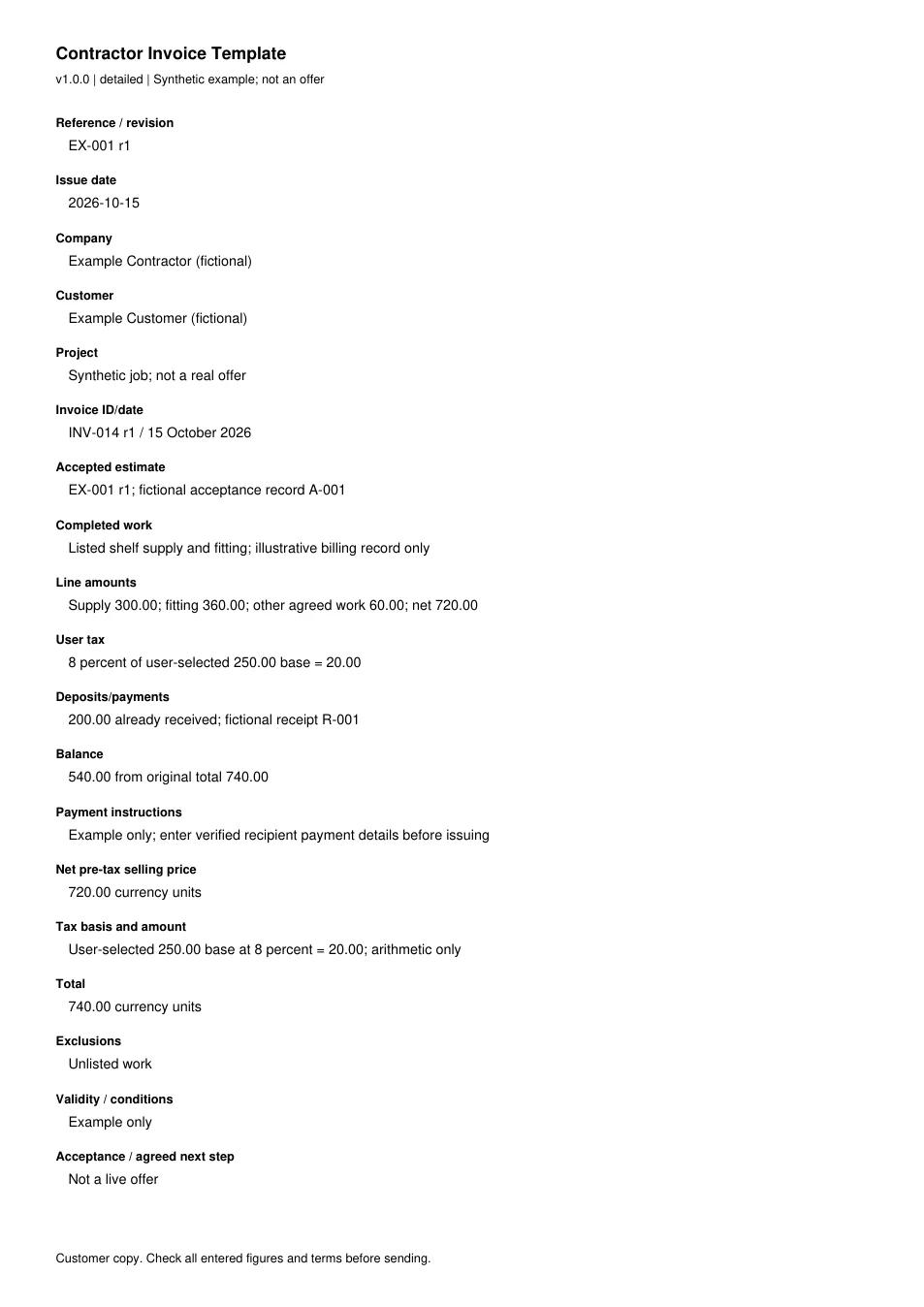
Read every field in the example
- Reference / revision
- EX-001 r1
- Issue date
- 2026-10-15
- Company
- Example Contractor (fictional)
- Customer
- Example Customer (fictional)
- Project
- Synthetic job; not a real offer
- Invoice ID/date
- INV-014 r1 / 15 October 2026
- Accepted estimate
- EX-001 r1; fictional acceptance record A-001
- Completed work
- Listed shelf supply and fitting; illustrative billing record only
- Line amounts
- Supply 300.00; fitting 360.00; other agreed work 60.00; net 720.00
- User tax
- 8 percent of user-selected 250.00 base = 20.00
- Deposits/payments
- 200.00 already received; fictional receipt R-001
- Balance
- 540.00 from original total 740.00
- Payment instructions
- Example only; enter verified recipient payment details before issuing
- Net pre-tax selling price
- 720.00 currency units
- Tax basis and amount
- User-selected 250.00 base at 8 percent = 20.00; arithmetic only
- Total
- 740.00 currency units
- Exclusions
- Unlisted work
- Validity / conditions
- Example only
- Acceptance / agreed next step
- Not a live offer