
Construction Estimating Takeoff (2026): Worked Guide

On this page21
- Construction estimating takeoff and estimate
- Construction estimating takeoff source register
- Set the scope boundary
- Check scale and dimensions
- Count items by type
- Measure lengths
- Measure areas
- Measure volumes
- Separate net, allowed and purchased amounts
- Use coverage with its conditions
- Transfer amounts into costing
- First two-room takeoff example
- Review the takeoff before pricing
- Update without losing the earlier scope
- File and client privacy
- Method and limits
- Keep a discrepancy register
- Check the transfer once more
- Original area worksheet
- FAQ
- Verdict on the construction estimating takeoff
A construction estimating takeoff is the record of amounts taken from a defined scope. It counts items and measures lengths, areas or volumes before cost rates are used. Keep the drawing revision, unit and math basis with every important amount so a later price can be checked.
Begin with the current file register and work boundary. Measure or count by item type, record units and show deductions. Keep net work, user waste and purchased goods distinct. Transfer amounts into costing only with matching rate units. A takeoff does not validate design, discover concealed conditions or supply a fixed labour or waste rate.
Page updated 25 October 2026. Source check dates are reported separately in the text and comparison.
Construction estimating takeoff and estimate
The takeoff answers how much of the defined work is present. An estimate adds cost inputs, task basis notes and price treatment. Keeping those roles distinct helps you find an error. A wrong amount needs a measurement correction.
A stale rate needs a cost-source update.
One workbook can hold both, but keep separate columns for the amount and its cost basis. Do not replace a measured amount with a vendor pack count without keeping the conversion. A client may need the net work scope while you need a larger buy amount for the order.
The GAO cost guide supports scope baselines, data, basis notes and updates. This page adapts that method to a small-job amount record. It does not claim to use a formal classification standard or give engineering design. Source checked 15 October.
Full revision date above.
Construction estimating takeoff source register
| Register field | What to record | Why it matters |
|---|---|---|
| Project record ID | Real job or package identity | Prevents mixing drawings from another job |
| File title | Plan, schedule or spec name | Makes the amount source traceable |
| Drawing number | The source's own record ID | Lets someone find the same view |
| Revision | Exact version used | A changed drawing may change amounts |
| Issue date | Date associated with that version | Distinguishes a new issue from an old file copy |
| Scope status | Included, excluded or open | Prevents a missing choice becoming a zero |
| Measurement basis | Count, length, area or volume | Controls the matching rate unit |
| Basis note | Any stated interpretation | Shows what needs later check |
| Takeoff record ID | Stable row or item identifier | Links the amount to cost and change records |
Scroll for more →
Check the register before measuring. A correct count against an old drawing is not a correct basis for a new offer. If the scope uses both drawings and a spec, keep both record IDs. A dimensioned plan does not necessarily contain every product or work need.
Save the real marked-up source or a clear measurement schedule where appropriate. Do not claim a site measurement when the amount came from a plan. Distinguish measured, counted, user-supplied and assumed values. Those are distinct forms of evidence even when they lead to the same number.
Set the scope boundary
Write the included work in plain terms. A floor area might set out new covering, but not removal, preparation, trim or disposal. Give those tasks their own status. Ask about interfaces so two work packages do not both include the same task or each assume the other includes it.
Separate known work from options. An unselected patio, ceiling finish or extra fixture should not enter the base amount. Record its amount under an option record ID if measured. When chosen, update the inclusion state and keep the offer revision linked to that choice.
Keep concealed or unmeasured work open. A drawing may show a desired finish without proving the substrate condition. Do not infer an unlimited repair amount from a simple area. Record the allowance or change basis used by the real offer and explain what remains unknown.
Check scale and dimensions
Use stated dimensions where available and relevant. If measuring from scale, record it and check against a known dimension on the actual file. A resized drawing may not preserve its intended scale. Paper size alone does not establish scale.
Keep units clear. Feet, inches and millimetres cannot be multiplied as though they were the same unit. Convert before calculating area or volume. Write the first dimensions and conversion so someone can reproduce the result without guessing what you meant.
If a scan or source file is not reliable enough to measure, keep the amount open. Ask for a usable dimension or source. A more precise-looking decimal does not improve a weak measurement basis. Record the limitation rather than entering a value to make the sheet complete.
Count items by type
Use separate rows for items that differ in spec or pricing basis. A count of windows may need a distinction between whole units and panes. A fixture count should name the type and supply role. Do not combine all devices into one amount if they use distinct cost rates.
Mark counted items in a repeatable way so you can find duplicates and omissions. Keep a room, location or drawing record ID with each group. A total count without a source schedule is harder to revise when one room changes.
For owner-supplied goods, record the supply role without erasing related work. Fitting, handling or checking may still be in scope. Avoid counting the same purchased item in both a goods line and a vendor lump sum. Resolve what each offer actually includes.
Measure lengths
Record each run or section with its reference and unit. Keep distinct types separate. A rate for one material does not apply to another just because both use feet. Note any fittings or other items already included in a rate so they are not added twice.
If the vendor sells in fixed lengths or packs, keep the net length before calculating buy units. Layout and cutting can affect the order. This guide supplies no fixed waste percent. Use the real chosen product and a stated user basis note for that step.
Example: a made-up trim schedule has three measured sections. The takeoff keeps each section and their net sum. The buy sheet uses the real stock length and layout basis. The client's scope sets out the included trim work, not an unexplained number of stock pieces.
Measure areas
A rectangle's area is length times width, using same units. Keep rooms or surfaces separate before summing. For an irregular shape, divide it into defined parts whose dimensions you can check. Keep the sketch or source record ID used for that division.
State how openings are treated. An opening deducted from wall area may still have trim or edge work. Do not assume one deduction rule settles every related task. Keep the net surface math distinct from the labour basis if the work is not priced solely by area.
In a made-up painting takeoff, the wall schedule records gross rectangles and named deductions. Ceiling and trim are separate scope items. The painting worksheet carries coat count and chosen product coverage after the surface amount is known.
Measure volumes
For a rectangular solid, volume is length times width times depth after unit conversion. A slab measured in feet with thickness in inches needs the thickness divided by twelve to become feet. Divide cubic feet by twenty-seven to obtain cubic yards. This is a unit relationship, not a slab-design rule.
The synthetic example uses twelve feet by ten feet by four inches. Net volume is twelve times ten times four divided by twelve and twenty-seven, or about 1.481481 cubic yards. The dimensions are invented and do not specify suitable construction for a real site.
Keep user waste and order rounding outside that net result. At a synthetic ten percent user waste, the amount is about 1.629629 cubic yards before vendor increments. The blank worksheet contains no default waste rate or vendor minimum. The concrete page keeps non-volume work separate.
Separate net, allowed and purchased amounts
| Amount stage | Meaning | What to check |
|---|---|---|
| Gross measurement | Defined surface or geometry before stated deductions | Source dimensions and units |
| Deductions | Named work removed from that measurement | Same item not deducted twice |
| Net work | Amount of the included measured task | Scope and option state |
| User allowance or waste | Clear estimating basis note | Real basis, not a hidden fixed rate |
| Needed goods | Net basis adjusted under the stated rule | Product coverage and unit meaning |
| Buy units | Orderable packs, lengths or delivery units | Vendor increment and rounding |
| Client scope amount | The work offered to the client | Not confused with leftover purchased goods |
Scroll for more →
These stages can have the same numeric value in a simple job, but they are still distinct records. Keeping the stages separate makes a changed product easier to check. A new pack size can change an order without changing the floor area or the client's work scope.
Do not round every intermediate measurement to a convenient whole number. State the precision and buying rule you use. Round at the stage where the real unit needs it. Currency rounding is a separate rule from amount rounding.
Use coverage with its conditions
Some materials are estimated from area and coverage. With per-coat coverage, quantity equals net area times coats divided by coverage. Use matching units. The selected product and actual surface determine the input basis; this guide supplies no universal coverage value.
If coverage is a range, do not silently use the most favourable endpoint as guaranteed performance. Record the chosen estimating basis and why it applies. Keep a user waste basis note separate so it can be reviewed. Follow the real manufacturer's instructions for the chosen goods rather than treating a generic equation as install work guidance.
For packs with a stated area coverage, divide the needed goods area by coverage per pack. Then round at the pack stage. Record the product, coverage unit and selection date. Do not use the same pack conversion after the product changes without checking it again.
Transfer amounts into costing
Use a stable takeoff record ID in the cost line. Copy the amount with its unit, inclusion state and source revision. Add the matching cost rate and its source. A number alone loses the context needed to spot a unit or scope mismatch.
Goods costs, labour time and other tasks may use distinct bases for the same work. Record each clearly. A square-foot goods amount does not on its own supply labour hours. This guide does not give fixed productivity basis notes.
Use a supported task basis for your real work.
Keep supplier lump sums distinct from your own line extensions. Check what a subcontract quote includes before adding separate material or labour costs. The same task must not enter both. Use the bid comparison to resolve inclusions and gaps first.
First two-room takeoff example
Imagine two made-up rooms with a chosen floor covering. Room A is a twelve-foot by ten-foot rectangle. Room B is a ten-foot by eight-foot rectangle. Their areas are 120 and 80 square feet, giving 200 square feet before any stated deductions.
Keep both room rows instead of only the total.
The user then records the chosen product's real pack coverage and their own layout or waste basis. The pack count is worked out from those entries and rounded to an orderable unit. No product coverage or waste percent is supplied by the example. Preparation and thresholds have separate scope lines.
If Room B changes, update only its source measurement first. Recheck the net sum and buy conversion. Then update the related cost lines and client offer. This traceable sequence is better evidence than editing a single final amount without a changed amount record.
Review the takeoff before pricing
| Review question | Practical check |
|---|---|
| Is the baseline current? | Match drawing titles and revisions to the real request. Keep the old record when a new issue changes amounts. |
| Is every area covered? | Compare the room or zone list with the defined work boundary. Mark exclusions and open spaces clearly. |
| Are items duplicated? | Check count marks, overlapping groups and vendor scope before summing. Do not rely only on a plausible total. |
| Do units agree? | Compare the measured unit, conversion and cost-rate unit. Keep pack and single-item values distinct. |
| Are deductions traceable? | Name each opening or excluded part. Keep associated edge or trim work separate where included. |
| Is waste clear? | Record the user basis and product relationship. Avoid a hidden percent added in several formulas. |
| Is rounding at the right stage? | Keep net measurements and round to the real buy increment only where needed. |
| Are options chosen? | Keep unselected work outside the base amount and total. Keep its own record ID for later acceptance. |
| Are unknowns still visible? | Do not rank a partly known offer as a fully resolved low price. Leave missing facts open until checked. |
| Can someone reproduce it? | Keep dimensions, source record IDs, math and basis notes together in the record. |
Scroll for more →
Update without losing the earlier scope
Give revised amounts a date and source revision. Record why they changed: a new dimension, selection, added work or correction. Keep the earlier takeoff tied to the earlier sent estimate. The latest workbook should not erase the basis of an offer already accepted or declined.
If the change affects several tasks, review each related line. A room-size change may affect goods, labour and trim apart. A product change may affect pack conversion without changing measured area. Do not assume one edited cell reaches every part of the estimate.
Use a short change register with record ID, affected scope, old basis, new basis and price impact where known. Unknown price impact stays open until the cost input is updated. The remodeling worksheet keeps phase changes and allowances linked to their record IDs.
File and client privacy
The takeoff and costing are working records. They may contain vendor record IDs, private notes or other job details. Send a separate client file with the scope and selling amounts needed for the offer. Hiding worksheets does not remove their data from the workbook.
Check the real client output. The measurement unit in the scope should be understandable, and the priced work should match chosen items. Do not include internal comments about a client's budget or another vendor's private terms. Keep the sent record ID and revision with the underlying takeoff.
For the complete price chain, see how to estimate construction costs. The pack homepage gives an original client preview. The mistake checklist covers unit, formula-range and export errors.
Method and limits
The geometric examples were recomputed from the stated dimensions and unit relationships. Currency extensions use an explicit two-decimal rule checked against Microsoft ROUND and Google ROUND. Purchase rounding follows the user-entered supplier unit; it is separate from currency rounding.
No source here shows local prices, fixed waste, production rates or trade suitability. Measurements from incomplete or unreliable files stay limited by those sources. A takeoff is useful evidence of defined amounts, not proof of a complete design, site condition or future real cost.
Keep a discrepancy register
Use a short register for facts that do not yet agree. A discrepancy is a question to resolve, not a reason to force a number into the takeoff. Name an owner and record the answer. Keep the old basis when the answer changes a quantity.
| Discrepancy | What to retain before resolution | How it affects the takeoff |
|---|---|---|
| Plan and schedule disagree | Keep both document references, their revisions and the affected item ID. Record the question sent through the project's actual clarification route. Do not silently choose the value that gives the lower price. | Leave the affected quantity unresolved, or use an explicitly labelled planning assumption where that is appropriate to the decision. |
| Scale check does not match | Record the known dimension and the measurement taken from the actual file. Note whether the file was resized or came from a scan. Avoid treating screen size as proof of drawing scale. | Obtain a reliable dimension or usable source before presenting the measured quantity as confirmed. |
| Product purchase unit is unclear | Keep the supplier's original description and ask whether the quoted unit means a piece, pack, length or area. Retain the written answer beside the price record. | Do not calculate an order count or comparable rate until the unit is known. |
| Opening treatment is inconsistent | Identify the surface and opening involved, along with the measurement rule used in the earlier rows. Check associated trim and edge work separately. | Correct the affected gross, deduction and net rows together without deleting the earlier record. |
| Two packages cover the same task | Keep both scope references and identify the overlap. Ask who supplies the item or performs the work under the actual package boundaries. | Remove duplicate cost only after the responsibility is resolved; do not assume one offer excludes it. |
| A necessary task appears nowhere | Record the missing work and the scope documents that show it is needed. Keep the quantity open if its extent is not known. | Add a defined line when resolved rather than hiding an amount in an unrelated material rate. |
| A site condition cannot be checked | State what was observed, what was supplied by someone else and what remains unknown. Avoid turning an unverified note into an inspection claim. | Retain the uncertainty and the actual allowance or change basis; an unknown is not zero. |
| A new revision changes several items | List the affected quantity IDs and their old and new document versions. Review related material, labour and other task rows separately. | Update the whole affected chain, then issue a price revision tied to the new takeoff. |
Scroll for more →
Check the transfer once more
Read the quantity and the cost rate aloud with their units. “Twenty feet at a price per foot” is a coherent multiplication. “Twenty feet at a price per pack” needs another step. Keep that step in the record. This check is small, but it exposes a mismatch that a valid spreadsheet formula may otherwise hide.
Original area worksheet
The pack includes blank and filled area-takeoff workbooks. They keep the drawing revision, dimensions and opening deductions together. Enter your own waste, pack coverage and order increment. Use the same square unit for deductions and coverage as for the measured area.
The order formula rounds the pack quotient to ten decimal places before rounding up. This removes binary number noise at an exact pack boundary. The net measurement stays separate from the purchase amount. Check the READY state and actual ordering terms before you transfer a quantity into costing.
The rounding steps were checked against Microsoft ROUNDUP and Google ROUNDUP on 15 October 2026. The file covers rectangular areas only. It does not measure drawings or solve cutting layouts, coat counts or slab volume.
FAQ
Is a takeoff the same as an estimate?
A takeoff records amounts against a defined scope. An estimate adds rates, task basis notes and other cost or price treatment. Keep those roles traceable even when one file contains both. A correct measured amount can still be paired with an old rate, and a correct formula can still use an obsolete drawing.
Should I deduct every opening?
Use and record the rule that fits the real measured task. An opening may reduce surface area while leaving trim or edge work. Do not use a hidden deduction to every related task. Keep gross measurement, named deductions and net work separate so someone can reproduce the amount and check a changed scope.
What waste percent should I use?
This guide supplies no fixed percent. Use the real product, layout and supported user basis note. Then keep that allowance separate from net measurement. A vendor buy increment is another distinct step.
Do not add the same allowance in several places or treat a synthetic example as a recommendation for the job.
Can software remove the need to check units?
No tool can make an undefined unit meaningful on its own. Check source scale, item type, conversion and rate basis in the real workflow. A digital amount still depends on the scope and input. Use the software comparison to distinguish takeoff needs from client-file features, without assuming that one feature name proves compatibility.
Verdict on the construction estimating takeoff
Keep a construction estimating takeoff as a reproducible amount record. Keep scope, units and source revisions. Then connect the checked amount to its cost basis and the clean client offer.
Inside the original file
This is the actual A4 example from the editable pack, version 1.0.0. All names, measurements, dates and amounts are invented for the form demonstration.
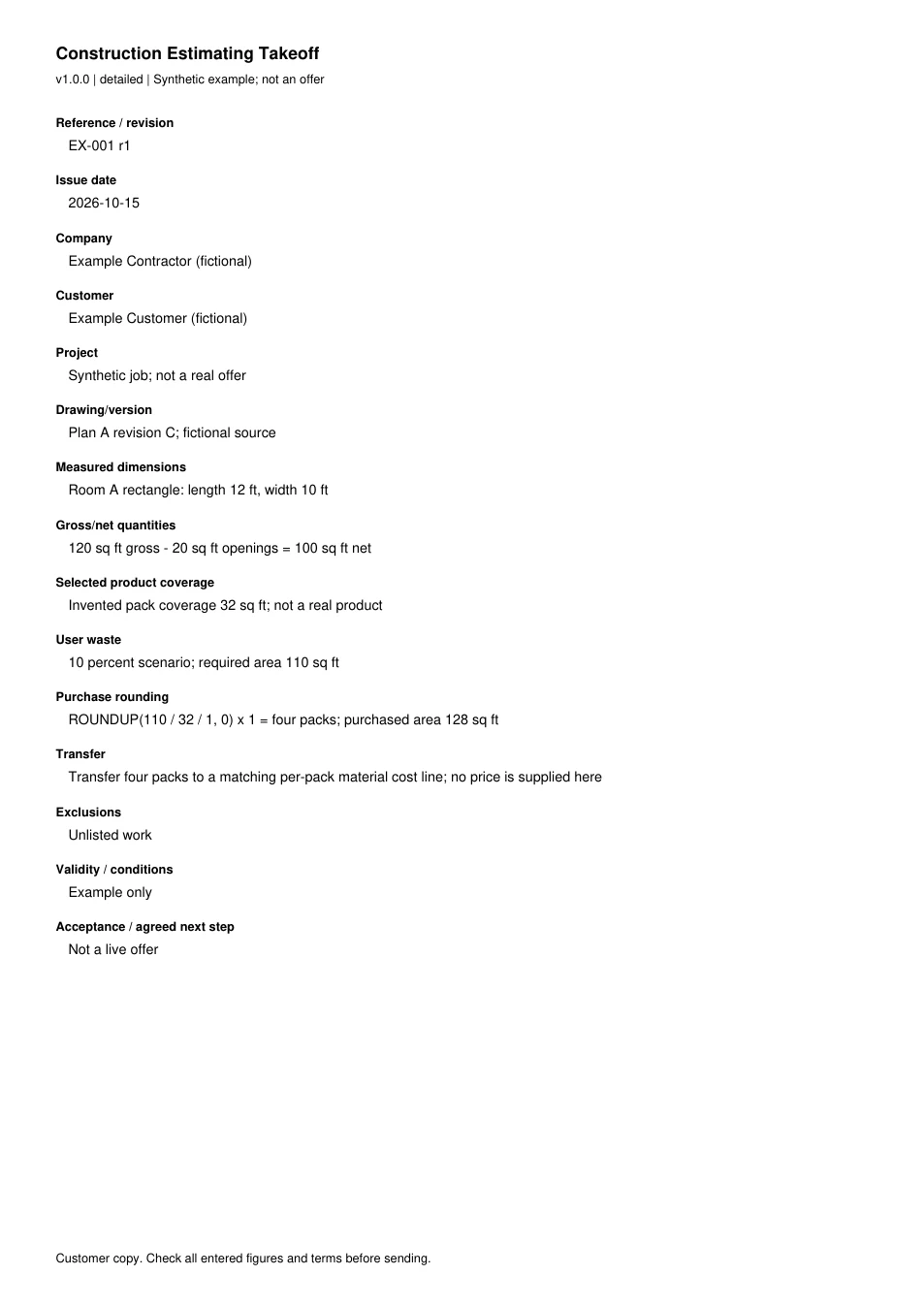
Read every field in the example
- Reference / revision
- EX-001 r1
- Issue date
- 2026-10-15
- Company
- Example Contractor (fictional)
- Customer
- Example Customer (fictional)
- Project
- Synthetic job; not a real offer
- Drawing/version
- Plan A revision C; fictional source
- Measured dimensions
- Room A rectangle: length 12 ft, width 10 ft
- Gross/net quantities
- 120 sq ft gross - 20 sq ft openings = 100 sq ft net
- Selected product coverage
- Invented pack coverage 32 sq ft; not a real product
- User waste
- 10 percent scenario; required area 110 sq ft
- Purchase rounding
- ROUNDUP(110 / 32 / 1, 0) x 1 = four packs; purchased area 128 sq ft
- Transfer
- Transfer four packs to a matching per-pack material cost line; no price is supplied here
- Exclusions
- Unlisted work
- Validity / conditions
- Example only
- Acceptance / agreed next step
- Not a live offer